

How to create an ID.me account






Make sure you’re ready to create your account. You’ll need a unique personal email address that only you use.
Note: Don’t use an email address that you share with someone else, like your spouse or family. And be sure it’s an email you’ll continue to have access to in the future. After you create your account, you’ll be able to add a second email to your account.
Select Create an ID.me at the start of this page. We’ll take you to the ID.me website to get started. You can follow along with the instructions here as you create your account.
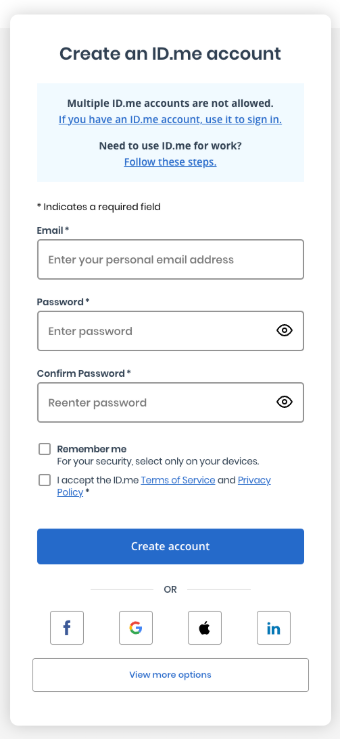
Select Create an ID.me account.
Enter your personal email. Then create your strong ID.me password that meets these requirements:
- At least 8 characters
- At least 1 uppercase letter
- At least 1 lowercase letter
- At least 1 number
Don’t include these in your password:
- Common phrases or repeated characters, like abc or 111
- Personal dates (like your birthday)
- Parts of your email address
- Parts of the same password you use for other accounts (like your bank account or email account)
Accept the terms of service and privacy policy. Then select Create account.
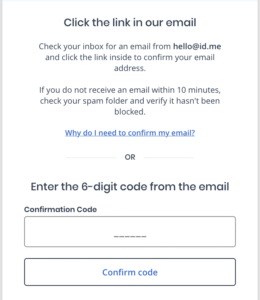
Check the inbox of the personal email address you entered to create your account. You’ll find an email from ID.me. Select Confirm your email. This will take you back to the ID.me website. Or you can enter the 6-digit code from the email on the ID.me website.
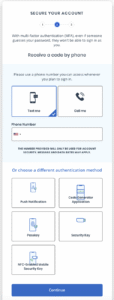
Set up multifactor authentication (MFA) to add more protection to your account. MFA is an extra layer of protection on your sign-in account. It helps us make sure that it’s you trying to use your account—and not someone pretending to be you.
Note: ID.me will share several MFA options you can choose from. We encourage you to choose the most secure options you’re comfortable with—like a passkey or an authentication application that you use to get a code each time you sign in. We also encourage you to add at least 2 MFA methods that you’ll always have access to. If you lose your MFA methods, you’ll have to create a new account.
Verify your identity for your account. This one-time process often takes about 10 minutes. You’ll need certain personal information and identification.